More Closings. Less Chaos.
Meet Your AI-Powered Transaction Assistant
Less Paperwork. More Closings.
What TransactTHAT Does for You:
- AI Contract Scanning — Upload contracts and documents for AI review.
- Automatic Date Extraction — Identify important dates and deadlines for your approval.
- Smart Transaction Checklists — Organize tasks from contract to close.
- Deadline Tracking — Stay ahead of important dates.
- Automated Client Emails — Keep buyers and sellers informed.
- Smart Reminders — Know what's due, overdue, and coming up.
- Document Organization — Keep important files in one place.
- Voice-Powered Tasks — Create tasks simply by speaking.
SAVE TIMESAVE MONEYCLOSE MORE DEALS
Less time on paperwork. Fewer missed details. More time for your clients and your next closing.
No credit card required.
Tuesday, September 22
Good morning, Jordan
2 of 5 transaction credits used this billing cycle
4
2
1
18
Active transactions
184 Willow Creek Lane
Buyer · Jordan & Casey Miller
Needs attention
- Today
Confirm earnest money receipt
184 Willow Creek Lane
- Tomorrow
Review inspection response
72 Hawthorne Avenue
- Sep 24
Send closing reminder
910 Peachtree Court
Your dashboard with active transactions, deadlines, tasks and progress — sample data shown.
AI Contract Reader
Upload Your Contract. Let AI Do the Reading.
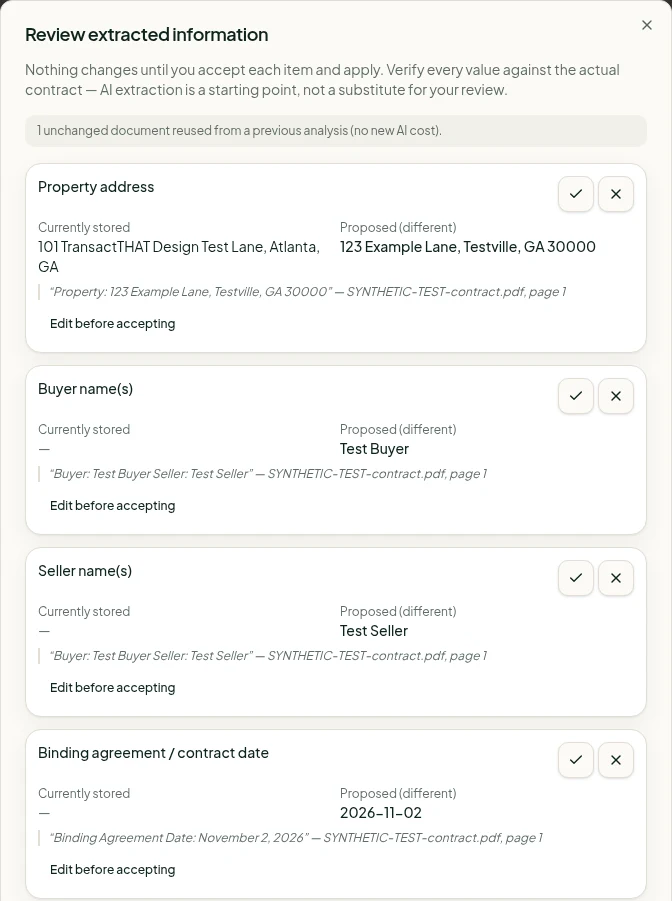
Stop hunting through pages of paperwork to find important dates and details. Upload your real estate contract and let TransactTHAT's AI Contract Reader help identify closing dates, earnest money deadlines, due diligence periods, financing dates and other important transaction information.
- 1Upload your contract or supporting documents.
- 2AI identifies available details and shows the quote and page it came from.
- 3Review, edit or reject each item.
- 4Apply only what you approve to your transaction.
You stay in control: nothing changes on your transaction until you review and approve it. AI can make mistakes — always check against the signed contract.
Talk to Task
Say It. Save It. Get It Done.
Have something you need to remember? Just say it. TransactTHAT turns your spoken instructions into organized tasks so you can spend less time typing and more time helping clients.
- 1
Say it
Tap Dictate task and speak naturally.
- 2
Check it
Review the title, due date and transaction.
- 3
Save it
It joins your task list and Today view.
Voice tasks work on the TransactTHAT website. Dictation isn't available in the iPhone and Android apps yet — typing tasks works everywhere.
"Remind me to follow up with the lender tomorrow."
Review your task
Check what we heard, adjust anything, then save.
Task
Follow up with the lender
Due date
Tomorrow
Transaction
No transaction (general task)
Real estate transaction management software
Less juggling. Fewer loose ends. More confident closings.
TransactTHAT is transaction management software for real estate agents who run their own deals: contract deadline tracking, buyer and seller checklists, documents and client updates for every pending transaction, in one place. New to organizing files? Start with our contract-to-close transaction checklist.
Transaction Dashboard
See active closings, approaching deadlines and important tasks in one place.
Smart Checklists
Buyer and seller workflows that walk each deal step by step toward closing.
Deadline Management
Earnest money, due diligence, inspection, financing, appraisal and closing dates — organized per deal.
Client Communication
Prepare and schedule professional milestone emails. You review and customize before anything sends.
Document Organization
Keep each deal's documents in its own private transaction workspace.
Today View
Overdue, due today and coming up — across every transaction, every morning.
Contact Management
Buyers, sellers, lenders, attorneys and co-op agents stay attached to the right deal.
Closing Progress
See what's done and what's left before closing day at a glance.
Checklists that keep moving
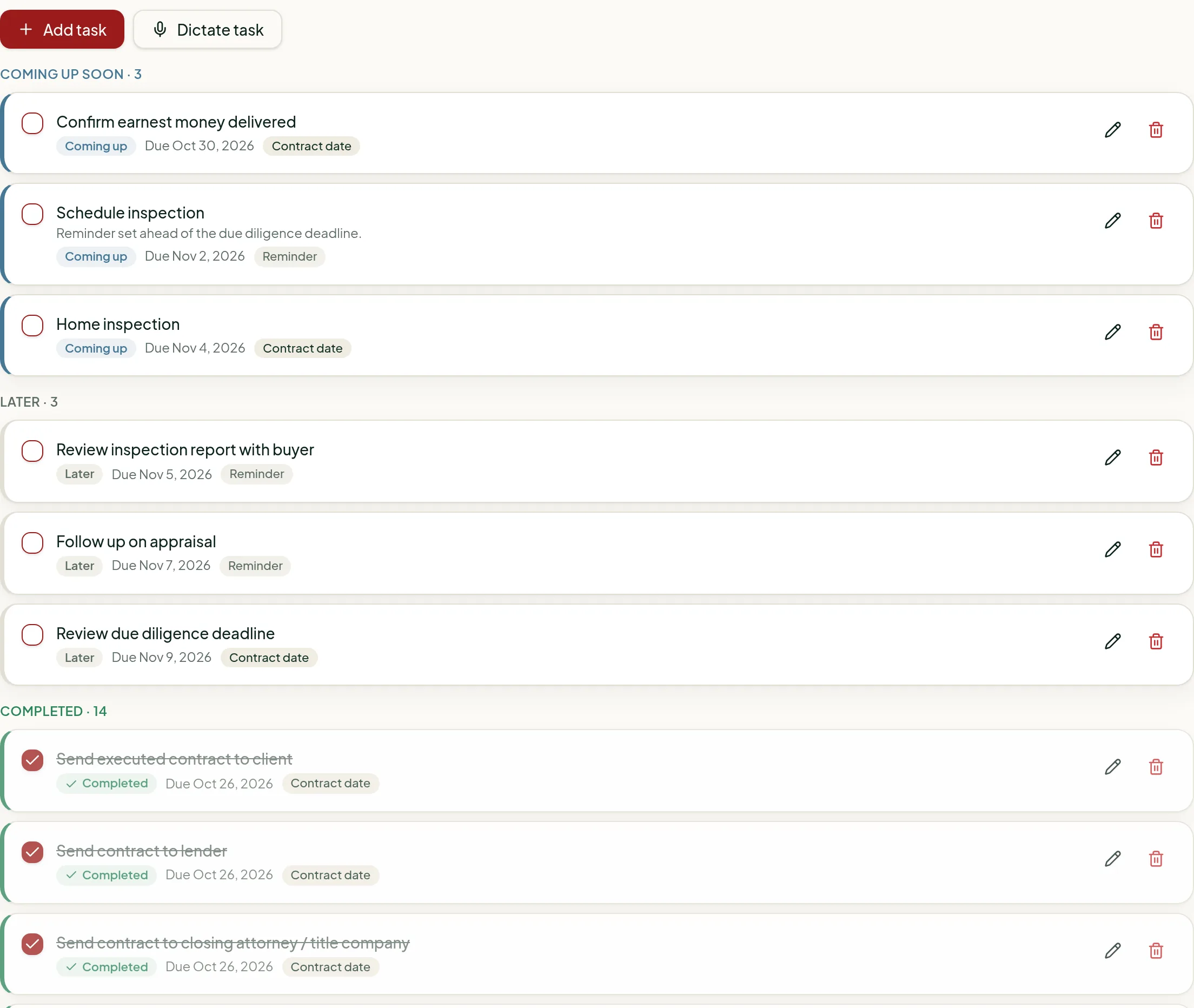
Every transaction gets dated buyer- or seller-side tasks from its contract dates. Add your own, dictate new ones and check them off as the deal progresses.
Overdue and upcoming tasks also roll up into your Today view.
How it works
Simple from the very first deal
- 1
Add your transaction
Enter the property and transaction details.
- 2
Let TransactTHAT help organize the work
Upload documents for AI review, create tasks by voice, and organize deadlines and checklists.
- 3
Stay ahead of closing
Manage deadlines, send client updates and track progress in one place.
No credit card required.
Built so you stay in control
- You approve every changeAI suggestions and voice tasks are shown for review first. Nothing is applied or saved without you.
- Your documents stay privateFiles live in your private account and open through short-lived secure links. They are not used to train AI.
- Emails you can trustClient emails go only to people on the transaction, and you can review and customize the wording.
TransactTHAT is an organization tool and does not provide legal advice. See our Privacy Policy.
Simple monthly pricing
Start with a 30-day FREE trial — no credit card required, includes one transaction — then choose a plan. Every plan includes the AI Contract Reader and Talk to Task.
Essentials
For agents closing a few deals a month.
$19/month
3 transaction credits per month
- 10 AI contract analyses per month
- Talk to Task voice tasks (website)
- 3 credits for new transactions each billing month
- Contract-to-close checklist from the dates you enter
- Deadline, task and closing tracking
- Documents, contacts and notes per transaction
- Client email reminders
Pro
For steady, year-round production.
$29/month
5 transaction credits per month
- 30 AI contract analyses per month
- Talk to Task voice tasks (website)
- 5 credits for new transactions each billing month
- Everything in Essentials
- Today view across every active transaction
- Automatic client deadline reminders
- Post-closing follow-up reminders
Elite
For high-volume individual agents.
$39/month
Unlimited transaction credits
- 100 AI contract analyses per month
- Talk to Task voice tasks (website)
- Unlimited credits for new transactions
- Everything in Pro
- No monthly transaction-credit cap
- Email branding and template customization
- Contract-to-close roadmap emails
Try every plan FREE for 30 days — no credit card required. The trial includes 1 transaction and 5 AI analyses. Subscribe Now starts your paid plan right away; cancel anytime under the subscription terms. Transaction credits count only new transactions created during each billing cycle; older records remain available.
Explore TransactTHAT
- AI contract reader for real estate agents
- Voice task management for agents
- Real estate transaction management software
- Realtor deadline tracking
- Real estate task management software
- Transaction checklist software
- Contract-to-close software
- Automated client reminders
- Transaction coordinator software
- Transaction management for solo agents
- Free buyer and seller transaction checklist
- Guides and checklists for agents
Frequently asked questions
- What is real estate transaction management software?
- Real estate transaction management software is an organized home for every deal you have under contract. It keeps the property details, contract dates, tasks, documents, contacts and notes for each transaction together and shows what needs attention next, so agents are not piecing a file together from email, texts and spreadsheets.
- What does transaction coordinator software do?
- Transaction coordinator software handles the organizing side of contract-to-close work: a checklist for each deal, deadline tracking across files, a place for documents and contacts, and reminders so dates are not missed. TransactTHAT adds client email reminders that you review and approve before they send.
- Can Realtors manage transactions without hiring a transaction coordinator?
- Many Realtors do. What makes it manageable is a system: every contract date written down in one place, a checklist per deal, and a daily list of what is due. TransactTHAT gives an individual agent that system so they can coordinate their own files. You remain responsible for the contract itself and for confirming dates with the parties involved.
- How do real estate agents track contract deadlines?
- Most agents start with a calendar or spreadsheet. With TransactTHAT you enter the dates from the executed contract, or upload it and approve the dates the AI Contract Reader finds — earnest money, due diligence, inspection, financing, appraisal and closing — and they stay on the transaction, feed your checklist and appear on the dashboard as overdue, due today or upcoming. Nothing is added to your transaction without your approval, and the contract stays the source of truth.
- What is contract-to-close software?
- Contract-to-close software follows a transaction from the day the contract is signed through closing day. It tracks each step in between — deposits, due diligence, financing, appraisal, walkthrough and closing — and shows how far each deal has progressed.
- Can transaction management software send client reminders?
- TransactTHAT can. You can schedule reminder emails to your client before important dates such as earnest money, due diligence, appraisal, final walkthrough and closing. You review the content, the email goes only to your client, and replies come back to your own email address.
- How much does transaction coordinator software cost?
- TransactTHAT includes a 30-day FREE trial with no credit card required, followed by a paid plan: $19 per month for Essentials (3 transaction credits per billing cycle), $29 per month for Pro (5 credits), or $39 per month for Elite (unlimited credits). Credits count only new transactions created during the current cycle. Existing records remain accessible, and you can change plans at any time.
- Can I track multiple real estate closings at once?
- Yes. Every transaction gets its own workspace, and the dashboard shows all of your active deals together with closings this month, tasks due today, overdue tasks and upcoming deadlines. The Today view pulls tasks from every active transaction into one list so you can work across several closings without opening each file.
- Who should use transaction management software?
- Individual real estate agents, Realtors who coordinate their own files, and in-house transaction coordinators managing several closings at once. If you are juggling contract deadlines, documents and client updates for more than one deal, transaction tracking software replaces the scattered notes and reduces the chance of a missed deadline.
Less time reading contracts. More time closing deals.
Try every feature free for 30 days — AI Contract Reader, Talk to Task, checklists, deadlines and client emails.
Start My 30-Day FREE TrialNo credit card required · 1 trial transaction · Cancel anytime